
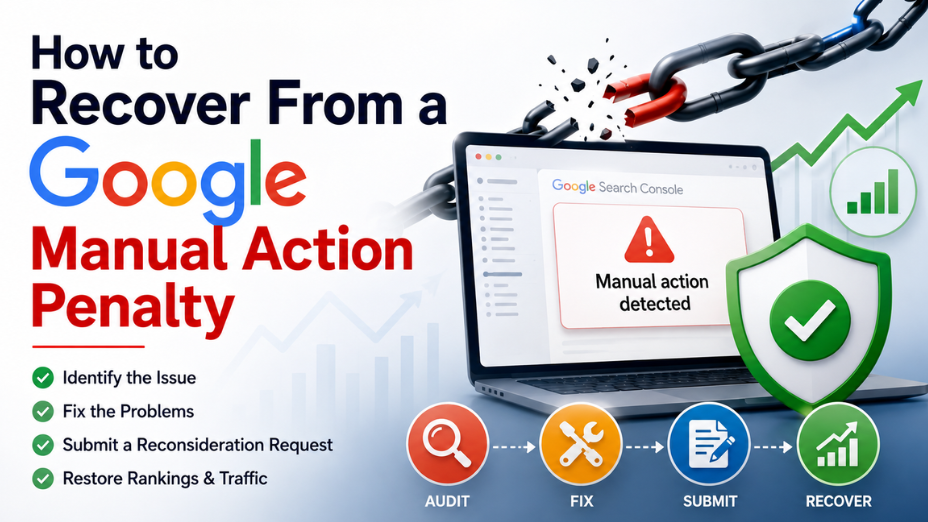
When your website traffic dropped suddenly, panic is usually the first reaction. Seeing an overnight cliff-drop in Google Analytics often points to one major issue: a Google manual action penalty. This recovery guide is built for business owners, webmasters, and marketing teams who need to diagnose, fix, and remove Google penalties to restore lost rankings. A manual action means a human reviewer at Google flagged your site for violating Search Essentials guidelines. The good news? Manual penalties are completely reversible when you follow a structured remediation process.
Before spending hours auditing your site, you must confirm what actually caused the loss of traffic. Not every traffic crash comes from a human reviewer at Google.
Here is how the two differ:
If your organic rankings vanished almost overnight and you suspect a Google manual action penalty, your next step is verifying it directly inside Google Search Console.
Confirming a manual action takes less than two minutes.
If your site is clean, you will see a green checkmark with the message "No issues detected".
If Google has penalised your site, you will see a red alert banner detailing the exact type of violation, whether it affects your entire site or specific URLs, and a brief explanation of why the penalty was applied.
Google does not hand out manual penalties randomly. Human reviewers issue them when a site aggressively violates search guidelines to manipulate rankings. Understanding the root cause is essential before trying to fix anything.
This is the single most common cause of a Google manual action penalty. If your link profile contains a high volume of low-quality, paid, or automated backlinks, Google flags them as link spam. Common triggers include links from private blog networks (PBNs), spammy directory submissions, or low-grade guest post networks with exact-match anchor text.
Google demands that web pages provide genuine value to readers. Pages generated automatically by AI without human editing, scraped content, doorway pages, or low-quality affiliate pages frequently trigger thin content penalties.
If your website sells outbound links or participates in link exchanges without using proper attributes like rel="nofollow" or rel="sponsored", Google will flag your site for trying to pass PageRank artificially.
If attackers exploit vulnerabilities in your CMS to inject hidden casino, pharmaceutical, or adult links into your pages, Google human reviewers will penalise the site to protect searchers from malicious content.
Attempting to trick search algorithms by hiding text with white fonts on white backgrounds, pushing text off-screen via CSS, or repeating target keywords unnaturally will lead to an immediate penalty once caught.
Adding rich snippet markup for products, reviews, or events that do not exist on the page tricks users in search results. Google penalises domains that abuse schema markup to gain unfair SERP real estate.
Recovering organic search rankings requires thoroughness, patience, and precise execution. Cutting corners during remediation will result in Google rejecting your appeal, pushing your recovery timeline back by weeks.
Do not start deleting pages or disavowing links blindly. You need an exact map of what is wrong with your site.
Starting with a detailed professional SEO audit helps pinpoint technical and structural liabilities before you attempt any fixes.
Google expects site owners to make genuine efforts to resolve issues manually before asking for forgiveness.
For brands with severe off-page penalties, transitioning to ethical link building services ensures your link acquisition strategy aligns with Google Search Essentials going forward.
Google human reviewers review hundreds of penalty appeals daily. They want clear proof that you took real action rather than just submitting a disavow file.
Create a shared Google Sheet containing:
Once the cleanup is complete, navigate back to the Manual actions section in Google Search Console and click Request Review.
Your written request must include three essential parts:
Keep your tone professional, honest, and objective. Avoid blaming Google, complaining about lost revenue, or making excuses.
After submitting your reconsideration request, Google human reviewers evaluate your application. Response times typically range from two to six weeks, depending on Google's current queue volume.
You will receive an official notification in Search Console with one of two outcomes:
Once a penalty is revoked, your pages will be re-indexed and allowed to rank again. However, traffic rarely jumps back to peak levels instantly. You must rebuild your domain authority through white-hat SEO tactics and ongoing optimization.
Many webmasters try to handle penalty removal internally, only to face repeated rejections from Google. The most common mistakes include:
Partnering with an experienced agency that offers comprehensive managed technical SEO services prevents these costly mistakes and protects your organic search channel.
A sudden loss of search visibility threatens lead flow, revenue, and brand reputation. Treating a penalty requires forensic accuracy, clear documentation, and a deep understanding of Google's quality standards.
We at GBIM know how frustrating it is when your website traffic dropped suddenly due to a Google manual action penalty. Our team helps businesses diagnose complex technical penalties, clean up toxic link profiles, overhaul non-compliant content, and manage the entire reconsideration process from start to finish. Our services support long-term search growth by replacing risky tactics with sustainable, white-hat SEO methodologies that keep your domain safe from future updates.
If your website is currently suffering under an active manual penalty, get in touch with our specialists today to begin your recovery path.
Check Google Search Console under Security & Manual Actions. If a penalty exists, Google will display an explicit manual action report detailing the violation.
Yes, once you fix the core violations and Google approves your reconsideration request, your site can fully regain its ranking capability and organic search visibility.
Google typically reviews reconsideration requests within 2 to 6 weeks, after which they send an official outcome notification directly to your Search Console inbox.
No, submitting a disavow file is only one part of the process. Google expects manual link removal efforts and detailed documentation before revoking a penalty.
If rejected, review the feedback, perform a more thorough audit to clean up remaining violations, update your documentation, and submit a fresh reconsideration request.
It depends on the severity. Google manual actions can be partial, affecting specific URLs or subfolders, or site-wide, impacting the entire domain's search rankings.
Follow Google's Search Essentials strictly, avoid purchasing low-quality backlinks, publish high-value original content, and conduct regular technical SEO audits to catch vulnerabilities early.
309, Rupa Solitaire,
Sector-1, Millennium Business Park,
Mahape, Navi Mumbai,
Maharashtra (400 710), INDIA.
Write to us at
hr@gbim.com